
CHANGE MANAGEMENT
Variations
A variation is a change to the scope, cost or programme of your contract. Alloovium helps you catch one early, turn it into a claim while the detail is fresh, and keep track of it through to approval — so entitlement is not lost to the paperwork.
Overview
Variations in Alloovium are more than a list. Each one records the change itself, the contract clause that entitles you to claim it, the cost impact, and the time impact — and it remembers where the change was first mentioned, whether that was a site update, an email, or a phone call.
Most variations do not begin life as a variation. They begin as a signal in the day-to-day flow of the job. Alloovium surfaces that signal as an action item on Today, helps you draft the variation from it, and then follows the draft as it is submitted and approved.
Why this matters
On a live job the risk is not that you raise a bad variation — it is that a legitimate change is never claimed because no one wrote it up in time. Surfacing the signal and pre-filling the draft is how Alloovium reduces that under-claim risk.From signal to claim
A variation moves through a predictable path. You are always in control of each transition; Alloovium does the retrieval and the first draft, and you decide what is submitted.
Surface
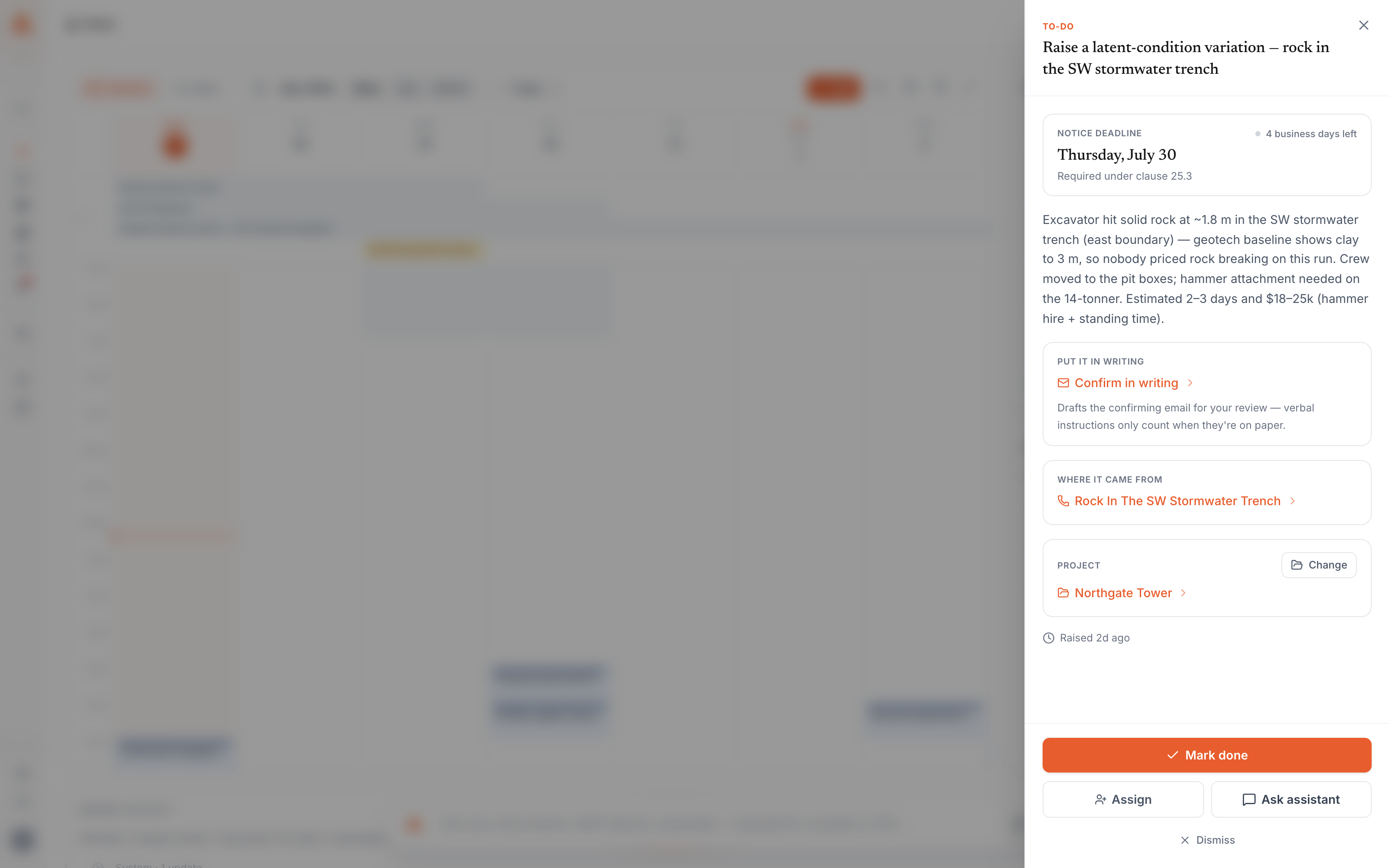
A potential change is detected in a site update, email or call and appears as an action item on Today with the kind set to variation.
Intake
Alloovium pre-fills the variation questions — scope, trigger, clause, cost basis, time impact — from the surrounding context, leaving you to confirm or correct.
Draft
From your answers, Alloovium creates a variation record and links it back to the action item so the trail is preserved.
Submit
You review the draft, then submit it. Alloovium renders the document and the status moves to submitted.
Track
When the contract-side signer responds, you record the outcome and the variation moves to approved or rejected.
Video · ~2 min
Raise a variation from a site signal
A change surfaces as an action item on Today; confirm the pre-filled intake questions, create the draft variation, submit it, and watch it appear in the register as submitted.
Where variations start
The starting point for most variations is an action item. Action items are the short list of things that need a decision from you, and they carry the provenance of where each one came from so you can trace a claim back to its source.
An action item destined to become a variation has its kind set to variation. It records the source of the signal, a verbatim quote where one is available, and any citations to the underlying update. Working an action item through to a draft is done from Today.
Meetings feed the same flow. When a change is discussed in a recorded meeting, Alloovium can surface it for your review and route it to a draft variation. See Meetings for how items extracted from a transcript are dispatched.
Intake and drafting
Drafting a variation happens in two moves. First, intake gathers the facts. Second, the draft turns those facts into a variation record you can edit and submit.
Intake
When you open the action item, Alloovium pre-fills a set of variation questions from the context it already has. Each question is pre-populated where possible and clearly marked so you know what was inferred and what still needs your input. The questions cover the scope of the change, what triggered it, the entitling clause, who identified it and when, the cost impact and its basis, the time impact and the affected activities, and whether the client has been notified.
Draft
Once you confirm the answers, Alloovium creates the variation. The cost impact and time impact you entered are written to the record, the entitling clause is stored as the source clause reference, and the citations and supporting evidence are kept alongside the draft. The action item is then linked to the new variation, so the two remain connected.
Grounded in your documents
The clause reference and supporting citations point back to the contract and correspondence in your workspace, not to generated text. Review them before you submit.Status and impact fields
A variation carries a small set of fields that together describe the change, its commercial effect, and where it sits in the approval process.
| Field | Meaning |
|---|---|
| Variation number | Your reference for the change, for example VO-042. |
| Title | A short description of the change. |
| Cost impact | The value of the change in the contract currency (default AUD). |
| Time impact (days) | Positive delays completion, negative recovers schedule, and empty means the change is cost-only. |
| Source clause reference | The contract clause that entitles the claim, for example cl 25.3. |
| Approver | The name of the contract-side signer, such as the Superintendent. |
| Disputed | A flag for a change that is contested. |
The status field follows a fixed sequence:
| Status | What it means |
|---|---|
| Draft | Under composition — not yet sent to the client. |
| Submitted | Rendered and sent to the client for review. |
| Approved | The client accepted the change. |
| Rejected | The client declined the change. |
Rejected is not the end of it
A rejected variation is worth keeping. Understanding why a claim was declined informs how you frame the next one, and the record of the change stays available for reference.Notice deadlines
Some changes — latent conditions in particular — carry a contractual obligation to give notice within a set window of discovering them. When a discovery date is captured, Alloovium tracks the notice deadline against it and shows how many business days remain.
The countdown appears on the action item so the deadline stays visible while you work. Items with a notice deadline are given prominence on Today, with the soonest due first, so a notice period does not quietly expire.
The variation register
The variations for a project can be listed together, with their number, title, status, cost impact and time impact, and the dates they were submitted and approved. This gives you a single view of every open and resolved change on the job.
The variation register for a project — rows listing variation number, title, cost impact and time impact, with a mix of draft, submitted and approved status badges and the submitted/approved dates visible.