
Document Control
Working with your trades
The document loop with subcontractors, trades and consultants runs through Exchange: the packages you issue for review, the documents you request back, and the outcome of every round-trip, tracked in one place instead of scattered across email threads.
Overview
Most document exchange with subcontractors happens over email and shared drives, where nothing is tracked and the status of any given file is a matter of memory. Exchange replaces that: each package you send or request is a tracked loop with a state, a version history, and an activity ledger recording who did what and when.
The other party doesn't need to be an Alloovium customer. You address a package to an email; the recipient gets access to the exchanged copy only — never your project — and everything they do to it is recorded on your side of the loop.
Sending and requesting
Exchange runs in both directions from the same workspace. Send a document issues a package to a trade — an amendment for execution, a drawing set for pricing. Request documentsasks a trade to supply something — their shop drawings, mix designs, or insurances — and gives them a place to put it that isn't an email attachment.
You can also work conversationally: ask the assistant to send the amendment to Lumino for signature and it stages the Exchange package as a draft for your confirmation — the same review gate as everything else the assistant does.
This is how project mobilisation runs without the spreadsheet: from every subcontractor, the same rule-based list — the signed contract back, licences, insurances — raised as requests with a state each, chased automatically, and visible on one board instead of forty follow-up emails.
Video · ~2.5 min
Mobilisation without the spreadsheet
A just-won job: per-subcontractor document requests going out through Exchange, a sub uploading against them from a clean guest link, an expired certificate sent back revise-and-resubmit, the board's one red row, and the chase routine nagging so you don't.
The review loop
When a trade submits their document back, the package lands in your queue marked Ready to review. You accept it or send it back with a note, and the outcome is recorded with the submittal vocabulary the industry already uses:
| Review outcome | Meaning |
|---|---|
| approved | Accepted as submitted — becomes the current version. |
| approved as noted | Accepted with comments; no resubmission required. |
| revise & resubmit | Sent back with a note; the trade revises and submits again. |
| rejected | Not accepted; the round-trip restarts. |
Every round-trip accrues to the package's revision history — who issued each version, who reviewed it, the notes exchanged, and the read and acknowledgement events along the way. The full cycle is shown on the Exchange overview, and when a returned document needs line-by-line scrutiny, paragraph-level diffs show exactly what changed between revisions.
Transmittals
A transmittal is a tracked package of project documents issued to another party — a consultant, subcontractor or client — with acknowledgement tracking, so you can see who has received a package and who is still outstanding rather than assuming a document landed because you attached it to an email.
Issue one conversationally — issue a transmittal to the structural engineer for the latest slab drawings — and the assistant assembles the package for your confirmation. Routines can also issue transmittals automatically, for example sending the updated drawing set whenever a new revision arrives. Ask the assistant “did the architect acknowledge the drawings?” to check status without leaving chat.
The board
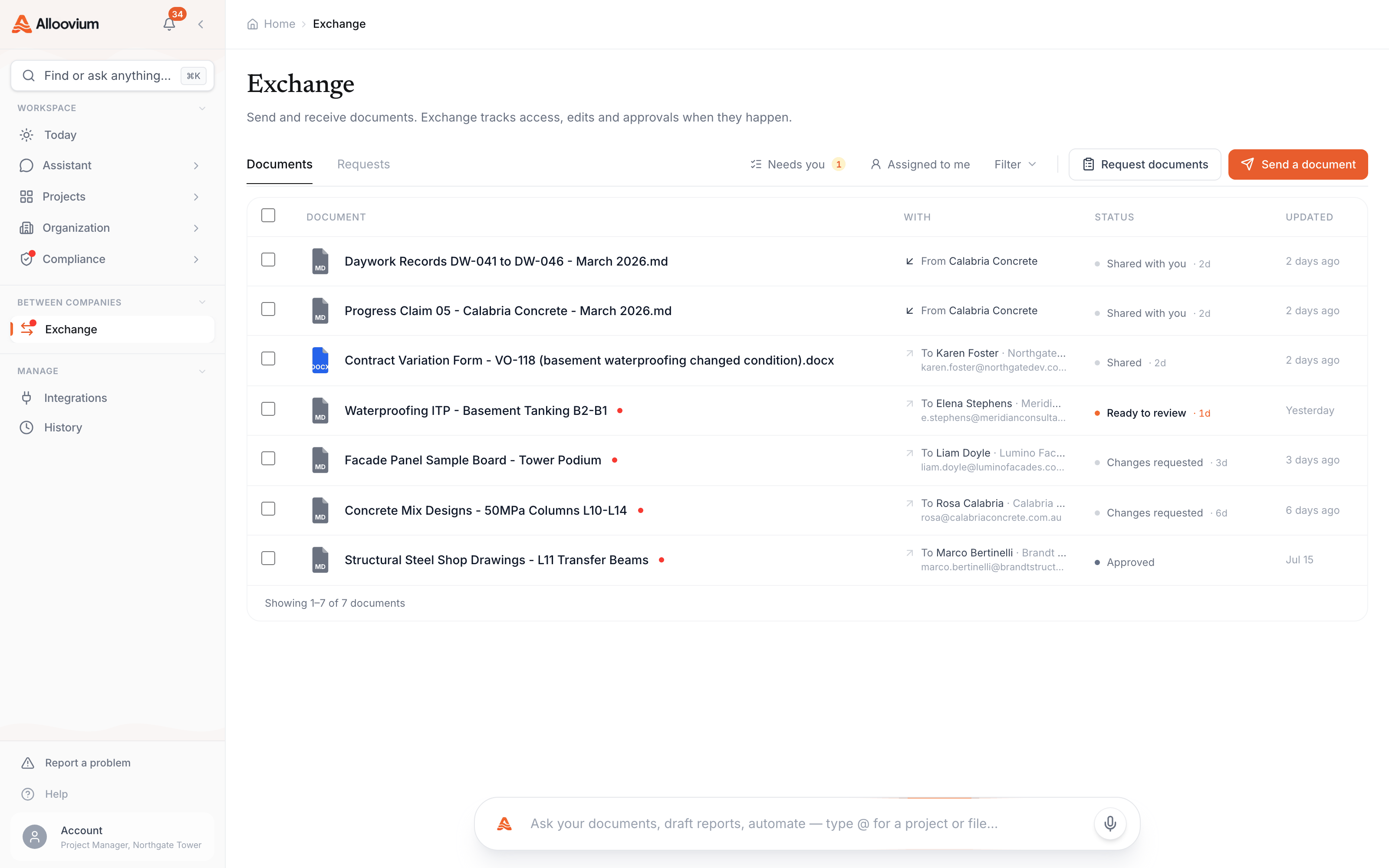
The Exchange workspace under Between companies is the status view for the whole loop: the Documents and Requests tabs split outbound from inbound, each row carries its state — shared, ready to review, changes requested, approved — with the counterparty organisation and dates alongside, and the Needs youcount keeps score of what's waiting on your review.
Video · ~2 min
A submission you can see moving
One trade package end to end through Exchange: send the package for review, the subcontractor submits their version, a revise-and-resubmit with a note, the corrected resubmission, and the approval — then the whole history read back off the revision timeline.
Availability
Exchange is enabled per workspace. If you don't see Exchange under Between companies in the sidebar, ask your administrator or your Alloovium contact.