
COMPLIANCE
Compliance in Alloovium
Compliance is not a separate product. It is a risk lens that reads the documents already in your project — spotting expiring credentials, unsigned records and evidence gaps, then surfacing them alongside your day's work.
Overview
Construction teams already hold the evidence an auditor wants: safety plans, ITPs, permits, inductions, registrations and certificates. The problem is rarely that the evidence is missing — it is that a plan quietly expired, a record was never signed, or a commitment made in a specification has no proof behind it. Compliance in Alloovium is the lens that reads for exactly those signals.
By default the lens is deliberately light. It watches documents as they arrive, detects a small set of deterministic signals — expiry dates, incomplete or unsigned records, blank templates — and raises a plain, trackable finding for each. No configuration and no separate console are required to get value on day one.
Video · ~2 min
Compliance as a risk lens
From signal to closed loop: a document arrives with an expiry date, the lens raises a finding in Requires attention, we open the citation on the exact page, then assign it, add resolution notes and resolve it out of the queue.
A lens, not a separate app
Everything in Alloovium sits inside one product built around your project documents. Compliance is one way of looking at that same corpus — a risk lens — rather than a place you go to do separate work. The findings it raises become items you act on in the flow you already use, and they link straight back to the source document and the exact page.
Two levels of depth are available. The light lens described above is always on. A heavier conformance engine — which extracts the commitments a project makes, searches the corpus for proof, and judges whether each is satisfied — is available when the compliance engine is enabled for your workspace.
Light by default, deep when enabled
The credential-expiry and unsigned-record checks run for everyone. The full promise-versus-proof engine, war-game scenarios and audit-pack assembly are available when the compliance engine is enabled for your workspace. Where a capability below is engine-gated, it says so.The credential-expiry backbone
The backbone of the light lens is expiry. When a document arrives, Alloovium reads it for expiry language — phrases such as expires, valid until or a recertification date — and parses the date next to it. If that date has passed, or is close, the lens raises a finding attributed to whoever uploaded the document.
Registered professionals are tracked the same way: a registration expiry on an engineer or other licensed role becomes a signal the lens can watch. The point is not to build a separate register you have to maintain, but to notice the dates that are already written into the documents you hold.
| Signal | What it catches | How it surfaces |
|---|---|---|
| Expiry | A plan, permit, certificate or registration past or near its expiry date | A finding attributed to the uploader, linked to the page |
| Unsigned / incomplete | A record left unsigned or with required fields blank | A finding flagging the incomplete document |
| Blank template | A template placed but never filled in | A finding prompting completion |
Deterministic, so it is quiet
Light signals are detected without any language model. They surface only when a real date or an unsigned marker is present, which keeps the lens from crying wolf. Dismiss a finding enough times and it stops resurfacing.Findings and gaps
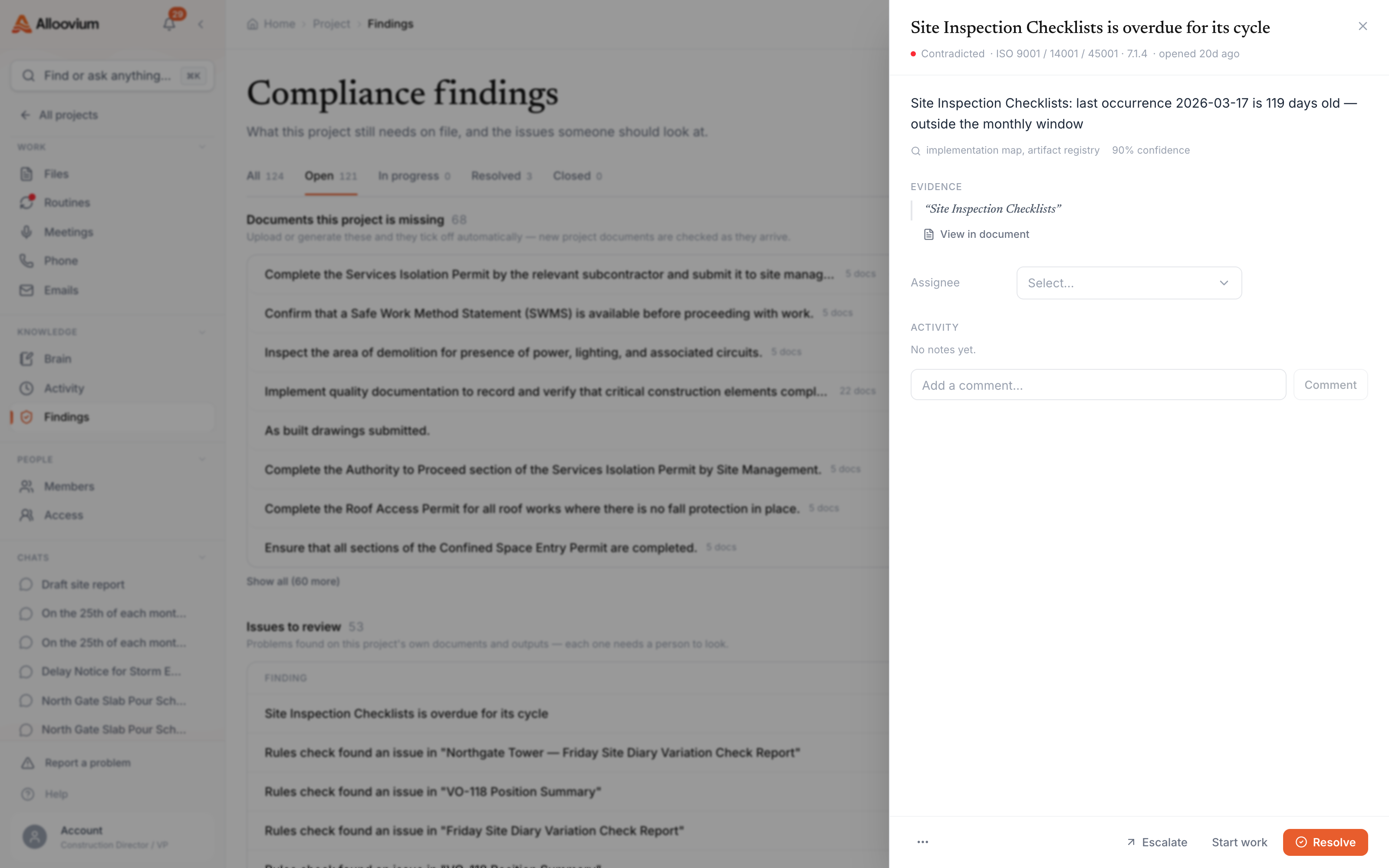
A finding is the unit of work the lens produces. Whether it comes from a light signal or from the deeper engine, it carries the same shape: a short title, a severity, a status, and — critically — a citation back to the document and page it came from. You can assign it, add resolution notes, resolve it, or dismiss it.
What a finding records
| Field | Meaning |
|---|---|
| Title | A short, human-editable description of the gap |
| Severity | Low, medium, high or critical |
| Verdict | Verified, partial, unverified or contradicted (from the engine) |
| Citation | The source document, page and excerpt the finding rests on |
| Status | Open, resolved or dismissed, with who is assigned |
When the compliance engine is enabled, findings are computed as gaps between what a project promises and what the corpus proves. That deeper analysis — conformance gaps, contradictions and the Attention surface that routes each gap to the person who can close it — is covered on the conformance and attention page.
Standards it understands
When the compliance engine is enabled, findings can be organised against management-system standards. The built-in rubrics cover the three ISO systems most construction and engineering teams carry.
| Standard | System |
|---|---|
| ISO 9001 | Quality management |
| ISO 14001 | Environmental management |
| ISO 45001 | Health and safety (WHS) |
Each standard is broken into hierarchical clauses with evidence hints, so a gap can point at the specific clause it relates to. The light lens does not require any of this — it works on raw document signals alone.
Working the queue
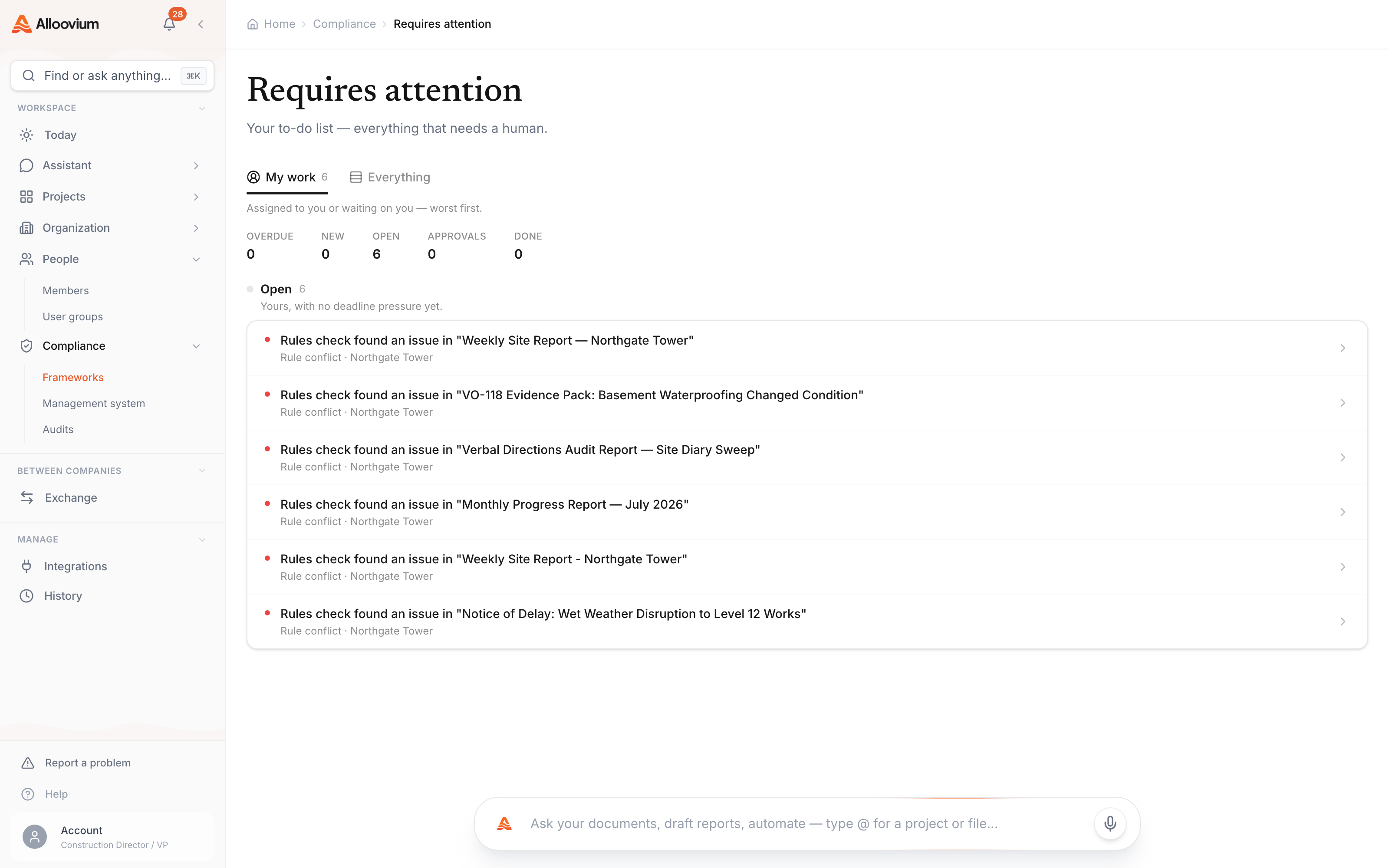
When the compliance engine is enabled, Compliance in the sidebar is the place to work: it lands on Requires attention — the queue of every open compliance item, with nothing to configure or filter. Each project also carries its own Findings board (open the project, then Findings) for the gaps raised on that job. Light-lens signals — an expiring credential, an unsigned record — also flow into the feed of things needing you on Today, so they meet you where you already work.
A signal is detected
A document arrives with an expiry date or an unsigned record, and the lens raises a finding.
It lands in Requires attention
The finding is attributed to a person and joins the queue, cited to the document and page it rests on.
You close the loop
Provide the evidence, then assign, resolve or dismiss. Resolved items leave the queue; dismissed ones stop resurfacing.
Where to go next
Two companion pages go deeper into the engine-gated capabilities:
- Conformance and attention — how project conformance gaps are computed, routed and war-gamed.
- Audit pack and evidence — assembling a point-in-time evidence dossier for an auditor.