
COMPLIANCE
Conformance & attention
The conformance engine reads the commitments a project makes, searches the corpus for proof, and judges whether each is satisfied. Where proof is thin, it raises a gap and routes it to the person who can close it.
Available when the compliance engine is enabled
The capabilities on this page — commitment extraction, evidence verification, conformance gaps, the Attention surface and war-game scenarios — are available when the compliance engine is enabled for your workspace. The always-on light lens is described on the compliance overview.Overview
Conformance is the deeper half of the compliance lens. Where the light lens reads for simple signals like expiry dates, the conformance engine asks a harder question: for every commitment this project has made, is there evidence in the documents that it was actually met? A commitment with no proof, weak proof, or contradicting proof becomes a gap.
The engine runs as a sweep over the project corpus. It extracts commitments, searches for the evidence that would satisfy each, judges the match, and publishes the results as findings. Every finding keeps the citation it was judged on, so you can always trace a gap back to the exact page.
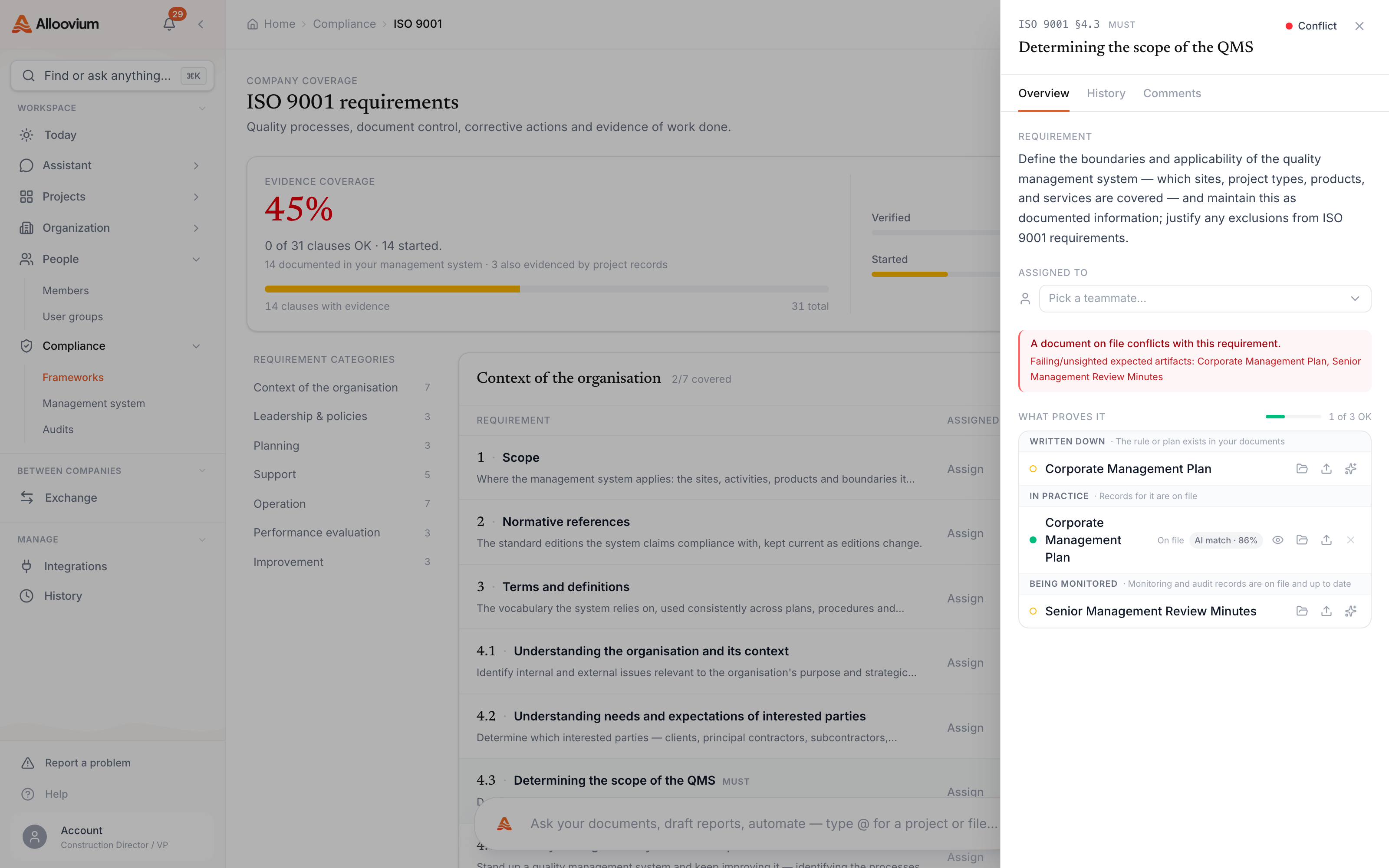
Promise versus proof
The engine models two things. A commitment is something the project promised — a control in a safety plan, an inspection required by an ITP, a clause in a specification. A verdict is the engine’s judgment of whether the corpus proves that commitment was met, together with the citations it relied on.
Extract commitments
Commitments are pulled from intention documents — plans, specifications and ITPs — and from document signals such as required inspections.
Retrieve evidence
For each commitment, Alloovium searches the project corpus for the records that would satisfy it, filtered to what you have permission to see.
Judge the match
The engine decides whether the evidence verifies the commitment, and records the reasoning and citations behind that verdict.
Publish findings
Anything short of verified is published as a gap and routed to a person through the Attention surface.
What counts as a gap
A gap is any verdict that falls short of fully verified. The engine grades each commitment so you can tell the difference between missing evidence and a genuine contradiction.
| Verdict | What it means | Treated as a gap? |
|---|---|---|
| Verified | The corpus proves the commitment was met | No |
| Partial | Some evidence exists but it is incomplete | Yes |
| Unverified | No evidence was found for the commitment | Yes |
| Contradicted | Evidence conflicts with the commitment | Yes (high priority) |
Findings carry a severity from low to critical, and roll up into a per-standard health picture — how many commitments are verified, partial, missing or contradicted. That summary is what tells you whether a project is broadly audit-ready or has critical gaps to close first.
A contradiction is louder than a gap
Missing evidence often just means a record has not been filed yet. A contradiction — evidence that conflicts with what was promised — points at a real problem and is surfaced with higher priority.The Attention surface
Finding a gap is only useful if it reaches the person who can close it. The Attention surface is how gaps become work. When a finding is published, it is attributed to the person tied to the source document and raised as an item they can act on, with a notification so it is not lost.
What keeps it quiet
To avoid a wall of noise, a finding surfaces only when it earns its place. Deterministic light signals surface directly. Engine verdicts must clear a relevance check and carry a verbatim excerpt — a citation with a page — before they appear. And a finding dismissed enough times is suppressed so it does not keep coming back.
Attention items appear in the same feed as the rest of your day on Today, tagged as compliance, so you triage them alongside schedule and cost work rather than in a separate silo.
War-game scenarios
A war-game is a forward-looking check. Instead of grading commitments already made, it asks what would happen if a specific situation arose — and whether the project’s documents show the team is ready for it.
You enter a scenario in plain language, for example bushfire on site or a subcontractor’s insurance lapses mid-works. Alloovium pulls the most relevant document excerpts and asks the model where the response would fall short, returning a short summary and a list of gaps, each with a severity and a recommended action.
Describe the scenario
Write what could go wrong in plain language.
Alloovium reads the corpus
It retrieves the most relevant excerpts from the project documents to ground the analysis.
Review the gaps
You get a summary plus specific gaps. Accept the ones worth tracking and route them to the risk register; dismiss the rest.
Grounded, not guessed
War-game gaps are drawn from what your documents actually say, not generic advice. Treat them as prompts for a human review — accept the ones that matter and dismiss the rest.Working a finding to close
Every finding — light signal, conformance gap or accepted war-game gap — moves through the same simple lifecycle so nothing is left half-open.
| State | Meaning |
|---|---|
| Open | Raised and waiting to be worked |
| Assigned | Given to a specific person to close |
| Resolved | Closed with resolution notes; leaves the feed |
| Dismissed | Judged not relevant; repeated dismissal suppresses it |
Once your findings are in good shape, you can package the supporting evidence for an auditor. That is covered on the audit pack and evidence page.