
COLLABORATION
Permissions
Permissions in Alloovium live on groups. Each group carries a matrix — areas of the platform down the side, permission levels across the top — and a person's effective access is the union of their groups. This page explains the matrix, the admin tier, and how project access layers on top.
Overview
There are no per-person permission settings. Everything someone can do is derived from the groups they belong to (see Teams & Groups), and a person in several groups gets the highest level any of them carries. That makes access reviewable: to know what a person can do, read their groups; to change what a whole role can do, edit one matrix.
Permissions are enforced at the data layer, not just in the interface. The assistant only retrieves and cites documents the asker is allowed to see, and the same access rules gate uploads, sharing and administration.
The permissions matrix
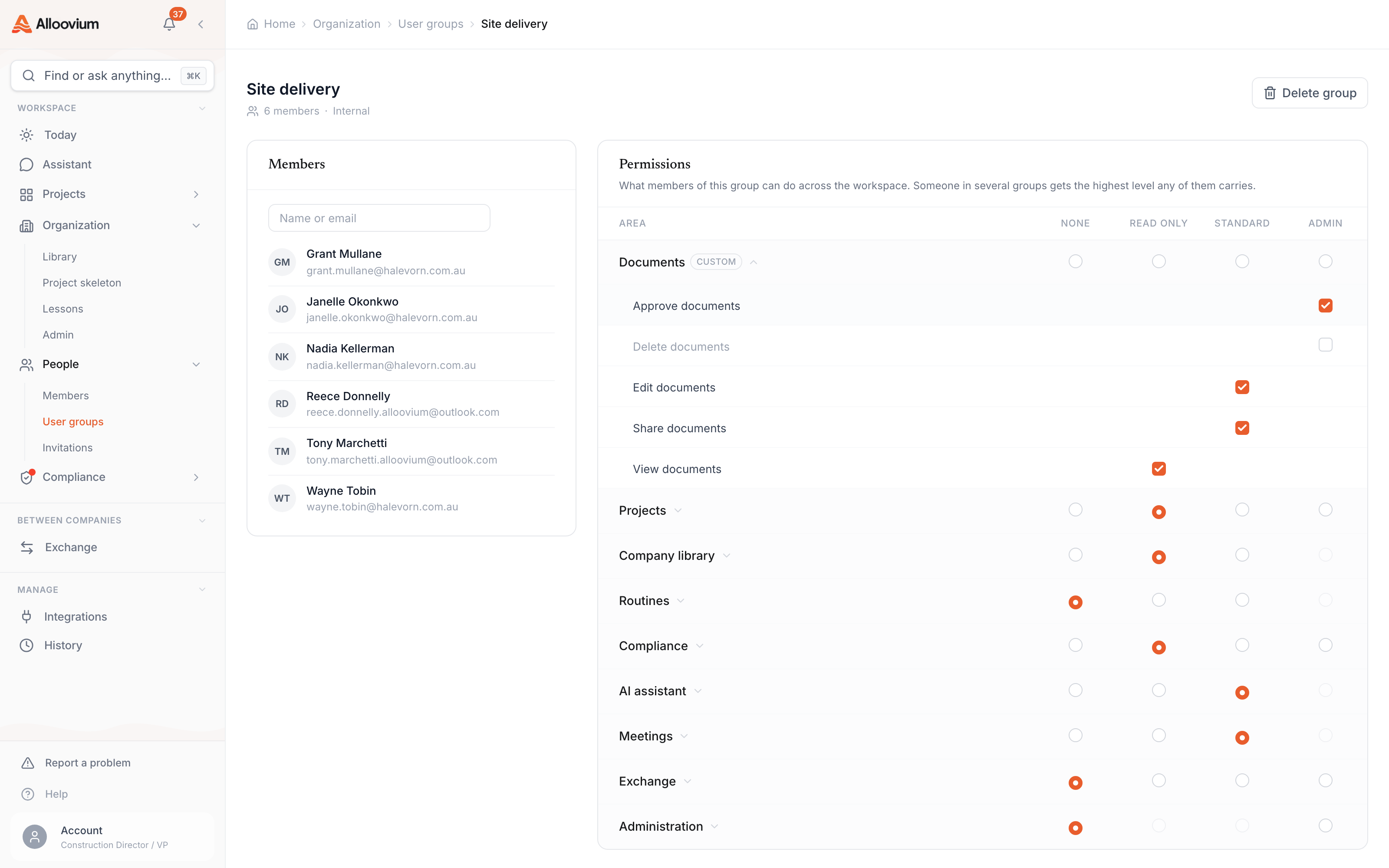
Each group’s matrix is managed from the group’s detail page at Organization → People → Groups. The rows are areas of the platform — Documents, Projects, Company library, Routines, Compliance, AI assistant, Meetings, Exchange, and Administration. For each area you pick a level:
| Level | What it means |
|---|---|
| None | The area is off for this group. |
| Read only | Members can view the area but not change it. |
| Standard | Members can do the everyday work — view plus create, edit, send or resolve, depending on the area. |
| Admin | Members also get the area's management capabilities — approving, deleting, managing members or settings. |
Levels are cumulative — each one includes everything below it. Under each area row the matrix can be expanded to the individual capabilities a level grants, and those capabilities can be adjusted directly; a group whose capabilities no longer match a preset level is marked Custom.
An example matrix
A typical mid-size builder might run groups like these. Each cell is the level that group holds for that area:
| Area | Read only | Site engineers | Contracts team | Organisation admins |
|---|---|---|---|---|
| Documents | Read only | Standard | Admin | Admin |
| Projects | Read only | Standard | Standard | Admin |
| Routines | Read only | Standard | Standard | Standard |
| Compliance | Read only | Standard | Read only | Admin |
| AI assistant | Read only | Standard | Standard | Standard |
| Exchange | Read only | Standard | Admin | Admin |
| Administration | None | None | None | Admin |
A site engineer in both Read only and Site engineers gets the higher of the two in every area. Notice that only the admins group holds anything in Administration — that area carries company settings, access management, billing, integrations and data export, and it is what gates the organisation settings pages themselves.
Organisation admins
Organisation admin is not a flag on a user — it is membership of the Organisation admins group. Members of that group manage people, groups and organisation settings, and the group is maintained automatically so it always reflects exactly who holds admin.
This has a practical consequence: granting or revoking admin is a roster change on one group, visible on that group’s detail page, rather than a setting scattered across user profiles. Inviting an admin is the same move — you include the admins group in the invite.
You cannot lock yourself out
You cannot remove yourself from the Organisation admins group — dropping your own membership would lock you out of the very pages used to manage access.Project access tiers
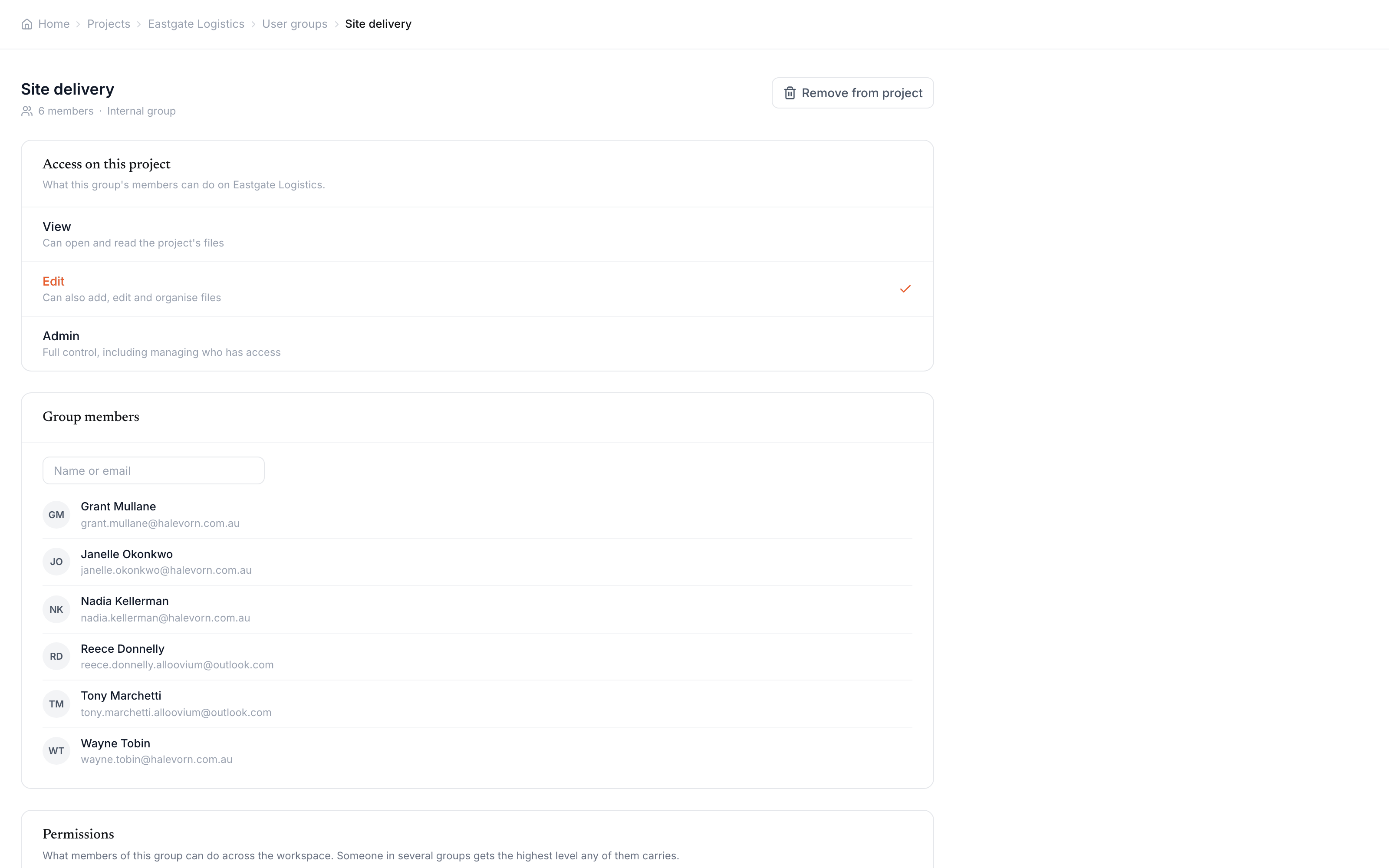
Group permissions apply organisation-wide. On top of that, each project grants its own access tier to each group that has been added to it, set from the group’s detail page on that project:
| Tier | What it grants |
|---|---|
| View | Can open and read the project's files. |
| Edit | Can also add, edit and organise files. |
| Admin | Full control, including managing who has access. |
The two layers work together: the project tier says how far a group can go on that project, and the org-wide matrix says what its members can do across the platform. A group can be Edit on one project and View on another without touching its matrix.
The view-only floor
Nobody in Alloovium has undefined access. Every member of the organisation belongs to the default Read only group — the organisation’s access floor, read-only everywhere — and a person invited to a project always receives at minimum read access to it, regardless of which groups the invite carried.
The floor only sets the minimum. Real working access comes from the groups above it, and removing someone from those groups drops them back to the floor rather than into a broken state. To take someone out entirely, an organisation admin deactivates them from the people directory.